One Product.
Endless Ad Creatives.
Upload your product once. Turn it into multiple commercial visual directions across different styles, scenes, and concepts—without organizing another shoot for every idea.
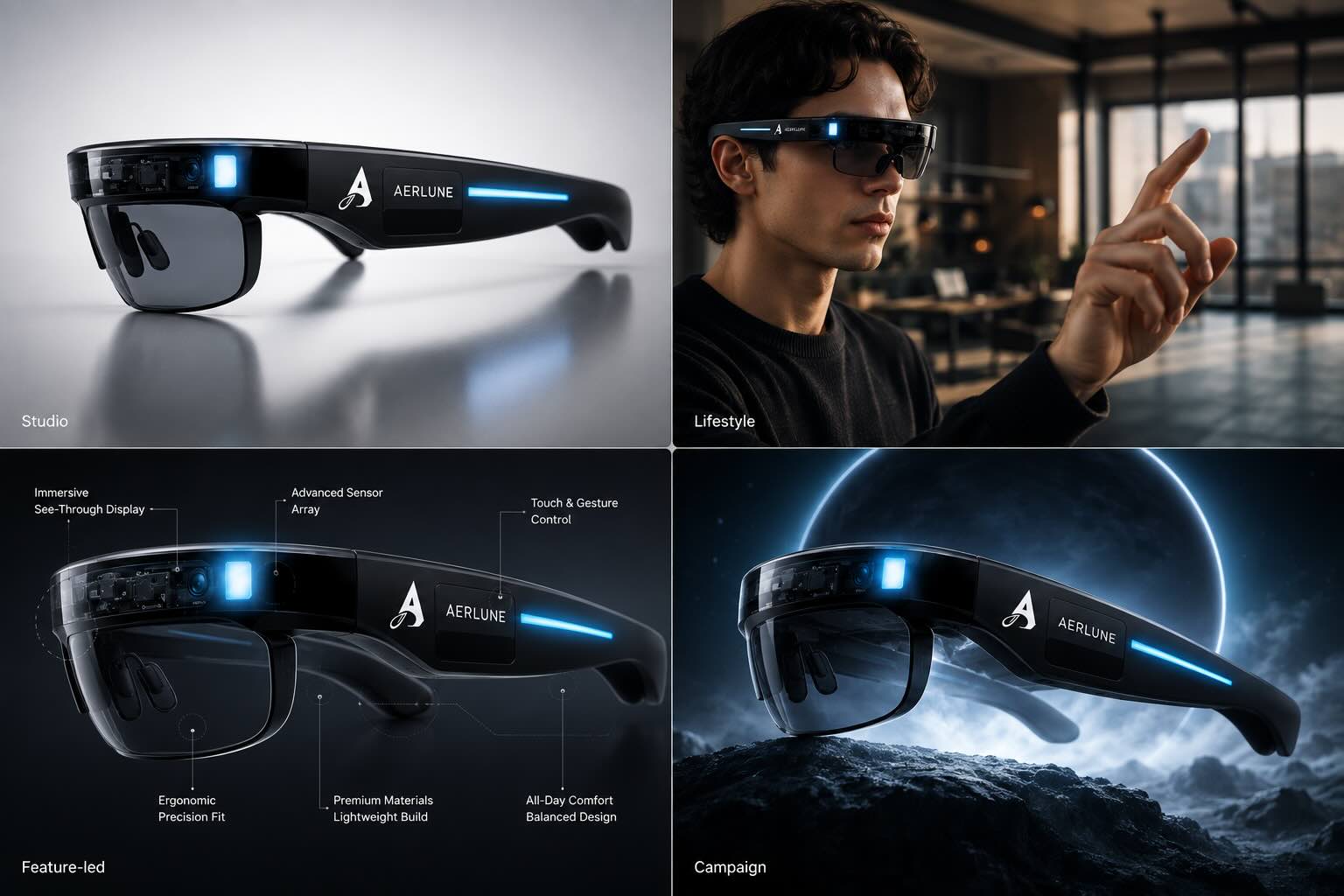
From product upload to a new creative direction.
See one product move from a basic source image into a polished commercial direction. Then repeat the process for the next audience, platform, concept, or campaign.
One SKU should not trap you inside one visual idea.
Paid creative improves through iteration. Product Transform gives the same product more ways to show up—so you can test context, mood, benefit, composition, and audience fit instead of asking one image to carry the whole campaign.
Studio Hero
Turn a basic product shot into a polished commercial image with intentional lighting, clean composition, and premium presentation.
Lifestyle Context
Place the same product into new environments so customers see where it fits, how it feels, and who it is for.
Feature-Led Creative
Build visual concepts around a benefit, ingredient, material, use case, or differentiator instead of repeating the same hero shot.
Performance Variations
Create multiple directions for paid-social testing without organizing a new shoot every time the campaign needs fresh creative.
Direct the idea. Let the production adapt.
Start with a clear image of the product you want to market.
Use a ready-made template or describe the commercial scene and marketing intent.
Create polished product visuals in new environments, layouts, and creative styles.
Build variations around the strongest concepts and put more creative hypotheses into market.
Use a template. Or turn the visual world around you into a starting point.
Product Transform is strongest when the blank canvas disappears. Start with a Truepix template when you want speed. Start with Reverse Engineer when you already know the creative logic you want to study.
Start from a Truepix template.
Pick a commercial format, add your product and brand details, then generate. Use this when you want a fast route from raw product photo to polished campaign visual.
Explore Product Transform →Start from a reference with Reverse Engineer.
Drop in a visual you want to understand. Truepix breaks down composition, lighting, layout, color, and creative structure into an editable template. Replace the variables with your product and brand—then generate a new direction from the logic, not a blank prompt.
See how Reverse Engineer works →There is a person in the shot? Use Human Transformer.
When the product lives on a body—apparel, eyewear, jewellery, accessories—Human Transformer rebuilds the whole frame around your model. Change the wardrobe, the pose, the environment, and the light, or reverse engineer a reference shot and cast it with your own product.
Explore Human Transformer →Struggling with the right words? Use Prompt Optimizer.
Turn a simple idea or a detailed request into a clear, production-ready prompt. Perfect for getting the exact scene, lighting, and mood you want for your product.
Explore Prompt Optimizer →One product. More surfaces. More hypotheses.
Meta & TikTok
Generate fresh visual directions for testing hooks, contexts, and product positioning.
Amazon FBA
Build polished product imagery and supporting listing visuals from the same source product.
Google Demand Gen
Create campaign-ready visual variations for formats such as 1:1 and 4:5.
Agencies
Move from client product assets to multiple presentable concepts before production becomes a bottleneck.
DTC & Ecommerce
Test more creative hypotheses without multiplying photography costs.
Launches & Seasonal
Reframe one product for new moments, offers, audiences, and campaign environments.
Not sure which model to use? How intelligent model selection works →
Before you upload your first product.
What is Product Transform?
Product Transform turns a standard product image into new commercial visual directions. You provide the product, then direct the scene, style, format, and marketing intent.
Do I need a professional product photoshoot first?
No. A clean product image is enough to start. Better source images and multiple useful angles can give you more flexibility, but the workflow is designed to reduce dependence on repeated physical shoots.
Can I create different ad concepts from the same product?
Yes. That is the core idea: one product should not lock you into one creative direction. Generate studio, lifestyle, feature-led, seasonal, and performance-oriented variations from the same product.
How does Reverse Engineer work with Product Transform?
Use Reverse Engineer when you already have a visual reference whose composition, lighting, layout, or creative structure you want to understand. It converts that reference into an editable template, then you replace the variables with your own product and brand details.
Can I start for free?
New Truepix users receive 70 free credits. Product Transform is the recommended place to experience the workflow before moving into heavier video production.
More angles to test. More chances to find what converts.
Upload one product photo and turn it into multiple commercial directions. Start with Product Transform and use your 70 free credits to see the difference yourself.