You already saved the shot.
Now cast it with your product.
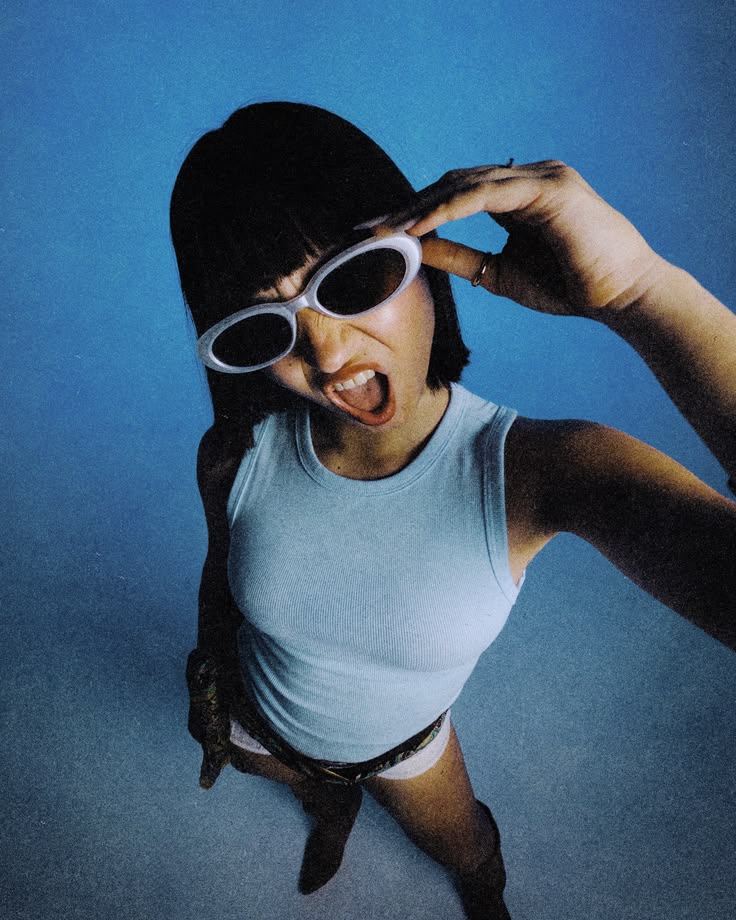
Drop in the reference you've been staring at — a pose, a campaign frame, a Pinterest save. Human Transformer reads the pose, the styling, the light, and the colour grade, turns it into an editable template, and rebuilds the whole frame around your model, your garment, your glasses, your brand.

Every good reference you save is a shoot you can't afford to book.
A model, a photographer, a stylist, a location, a half-day of everyone's time — then usage rights, then reshoots when the drop changes. So most Shopify brands ship the same flat-lay and the same one model in the same one pose, all quarter, into an ad account that punishes creative fatigue faster than anything else. The reference board fills up. The store stays the same.
The board nobody uses
Hundreds of saved poses, campaign frames, and styling references — and no realistic path from any of them to your own product page.
One look per drop
Physical shoots force you to pick a single direction before you know which one converts. The test happens after the money is spent.
Creative fatigue
Paid social eats variations. A single model shot cannot feed a testing calendar that needs new angles every week.
Production used to punish experimentation. Human Transformer makes experimentation the workflow.
Don't describe the pose. Extract it.
Click Create Template and upload the reference. Truepix reverse-engineers the human decisions inside it — how the body is angled, where the weight sits, where the eyes go, how the hair falls, how hard the light is, how the colour is graded, what the environment says. It hands all of that back as an editable prompt template with every changeable element mapped to a variable. You swap the variables for your own product and press generate.
Drop the reference
A saved pose, a campaign frame, an editorial crop, a UGC selfie, or one of your own best-performing shots.
Truepix reads the frame
Pose and body language, camera angle and crop, wardrobe styling, expression, environment, lighting direction, colour grade.
Edit the variables
Change the model. Change the garment. Add the glasses. Swap the background. Warm the grade. Every variable is yours to move.
Generate your version
A finished frame that inherits the creative structure of the reference and belongs entirely to your brand.
From “I love this pose” to “this is our eyewear campaign.”
You save an editorial frame: three-quarter turn, chin slightly down, soft window light from camera-left, warm desaturated grade, concrete backdrop. Create Template gives you every one of those decisions as a variable. You keep the pose, the light, and the grade. You change the model, put your frames on her face, swap concrete for a sunlit studio wall, and hold the smile. Ninety seconds later you have the shot — and the template is still sitting there, ready for the next four colourways.

What Truepix reads in the subject
What Truepix reads in the shot
Change the person, the clothes, the room, or the light. Keep the shot.
Wardrobe swap
Put a different garment, colourway, or full outfit on the same subject. One model image becomes the whole drop.
Pose direction
Reangle the body, shift the stance, change the hands, adjust the gaze — without asking anyone to stand back on the mark.
Environment & backdrop
Move the same shot from a seamless studio wall to a Lisbon street, a beach at golden hour, or a minimalist showroom.
Lighting & grade
Soft editorial light, hard flash, moody low-key, warm film grade. Match your brand’s visual language across every asset.
Add people to the frame
Bring a second model into the shot, build a group scene, or add the partner, friend, or family the story needs — generated, not licensed.
Restore & reunite
Repair, colourise, and rebuild old photographs. Bring damaged memories back into frame, or place people together who were never photographed together.
And when the still is right, send it through Image to Video — the same frame, now turning, walking, or breathing for Reels and TikTok.
Generated models. No day rate, no usage window, no renewal email.
Every model in a Truepix frame is generated — not a licensed stock person with a contract expiry attached to it. That means you can build a cast that actually looks like your customers: different ages, body types, skin tones, and markets, across the same garment and the same pose, in one afternoon. Show the same jacket on four different people and let the ad account tell you which one converts.
- No day rates, agency fees, or travel.
- No usage windows expiring mid-campaign.
- Represent your actual customer base without a four-model booking.
- Regenerate the moment the product, season, or offer changes.
Same product. Six directions. Zero shoots.
Every frame below started as one uploaded image.
Reference pose from a moodboard → the same energy, our product


Low-angle reference → editorial three-quarter turn, same frames, same sun


Same frames, new styling → studio orange to hard directional light
From product page to paid social, without a production calendar.
Shopify PDP & lookbooks
On-model imagery for every SKU and colourway, consistent in styling and light across the whole catalogue.
Apparel & accessories
Show fit, drape, and movement on a real body instead of asking a flat-lay to do the work of a fitting room.
Eyewear, jewellery & beauty
Close-crop frames where the product sits on the face — the hardest and most expensive shot to book, generated on demand.
Meta & TikTok creative testing
Feed the algorithm variations. New pose, new model, new environment, same product, same week.
Amazon FBA lifestyle images
Lifestyle slots in your listing gallery, built to the aspect ratios each placement wants.
Seasonal & drop campaigns
Reframe the same inventory for a new season, offer, or audience without re-booking anything.
Some images aren't for selling. They're for keeping.
The same engine that restyles a model shot can repair a torn photograph, colourise a black-and-white frame, or put people in the same picture who never got the chance to stand next to each other. Upload the memory. Get it back, whole.
Watch a reference become an editable template.
This walkthrough shows the Reverse Engineer workflow on Truepix — the same Create Template mechanic Human Transformer runs on. Watch how a reference image gets broken into editable variables, then imagine the variables are your model, your garment, and your pose.
Five tools. One creative stack.
| Tool | Use it when | It gives you |
|---|---|---|
| Human Transformer | You have a person in frame and want to change the clothes, pose, lighting, environment — or rebuild a reference shot with your product. | A new still image. |
| Image to Video | The frame is right and you want it to move — a turn, a walk, a subtle push-in for social. | A short video built from your finished still. |
| Product Transform | The product is the hero and there's no person in the shot. | Commercial product visuals and ad layouts. |
| Ads Agent | You want the whole ad — script, voiceover, music, edit — for a tangible product. | A finished video ad. |
| Prompt Optimizer | You have an idea but need help writing a clear, production-ready prompt for generating images or videos. | An optimized prompt. |
Most apparel brands run Human Transformer for the on-model frames, Product Transform for the flat and hero shots, push the best frames through Image to Video for social, then hand the winners to the Ads Agent.
Study the structure. Bring your own identity.
Human Transformer is built to help you understand why a frame works and rebuild that logic around your brand. It is not permission to reuse someone else's protected material or someone else's face.
Pose, lighting structure, composition, and pacing are creative decisions you can learn from. Logos, garments, artwork, and photography belong to whoever made them.
Generating a recognisable celebrity, influencer, or private individual without consent is off-limits — including in a "similar style" frame.
Avoid rebuilding a distinctive campaign so closely that your output functions as a substitute for the original.
Your past shoots, licensed assets, approved client work, and public-domain material are the safest starting points.
Before you rebuild your first shot.
What is Human Transformer?
It's an image tool for anything with a person in it. Upload one photo and change the wardrobe, pose, environment, lighting, or expression — or reverse-engineer a reference image into an editable template and rebuild the whole frame around your own model and product.
How is the reverse engineer feature different from just writing a prompt?
A prompt starts from a blank box and your memory of what you liked. Create Template starts from the actual reference and maps its creative decisions — pose, light, grade, styling, composition — into labelled variables. You edit what should change and keep what shouldn’t.
Can I put my own product on the model?
Yes. That is the main workflow for apparel, eyewear, jewellery, and accessories brands: keep the pose and the light, replace the garment or the product, generate the frame.
Do I need a professional photo to start?
No. A clear, well-lit source image is enough. Better inputs give you more control, but the whole point is to stop depending on repeated physical shoots.
Are the generated models licensed? Do I owe usage fees?
The people Truepix generates aren’t licensed stock talent, so there is no day rate, usage window, or renewal to track. Recreating a real, identifiable person’s likeness without their permission is not supported.
Can I add more than one person to an image?
Yes. You can bring additional people into the frame to build group scenes, lifestyle context, or two-person compositions.
Can I restore old or damaged photographs?
Yes. Repair, colourise, and rebuild older images — and place people together in a frame that never existed.
Can I turn the finished image into a video?
Yes — Human Transformer produces stills, then Image to Video adds the motion. Generate the frame you want, send it through Image to Video, and you have a moving asset for Reels, TikTok, or a product page loop built from the exact shot you just directed.
Can I keep the same model across a whole catalogue?
Human Transformer works image by image. For consistent characters across many images, Fine-Tuning is the feature built for that.
What formats can I export for Shopify, Meta, and Amazon?
Generate the frames you need and produce the platform ratios your placements ask for — vertical for social, square and 4:5 for feed and Demand Gen, clean crops for listing galleries.
Can I try it for free?
New Truepix accounts start with 70 free credits. Human Transformer and image generation are the best places to spend them — upload one photo, rebuild one shot, and judge the leap yourself before moving into video.
What happens if one detail is wrong?
Change the variable and regenerate. The template stays intact, so you're adjusting one element, not rebuilding the whole idea.
How does Human Transformer compare to canvas tools like Flora AI?
Canvas tools like Flora are built for infinite exploration and node-based concepting, but turning concepts into campaign-ready on-model imagery often requires manual rebuilding. Human Transformer automates that production step by deconstructing the pose, lighting, and wardrobe from any reference shot around your model. We broke down the workflow differences in our guide to Flora AI alternatives for agencies & brand teams.
Need more credits? See pricing →
The shot you keep coming back to is a template. Go build it.
Upload one image, extract the pose and the light, drop in your product, and generate the campaign frame you've had in your head since the last drop. Your 70 free credits are enough to see the difference.