AI ad creative for ecommerce

Turn what you know about your product into more creative directions to test.

Start with a product photo, an idea, or a reference you want to understand. Truepix helps ecommerce teams reverse engineer creative structure, develop stronger prompts, generate original product visuals, and turn the best directions into video.

You direct the hypothesis.Truepix handles the creative production layer.

Product photos · Static ads · Lifestyle visuals · Creative references · Image-to-video · Product video ads

The direct answer

What is an AI ecommerce ad creative workflow?

An AI ecommerce ad creative workflow helps a brand move from a product, selling idea, or creative reference to multiple advertising concepts that can actually be tested.

The important part is not generating one attractive image. It is creating a repeatable loop that keeps research, direction, production, and learning connected.

Truepix brings the creative parts of that loop together so ecommerce operators can spend less time moving between prompt boxes and more time deciding what deserves to be tested.

Find a signal
Understand the creative logic
Develop a direction
Generate the asset
Test it
Learn and iterate
The workflow

Ecommerce creative should be a loop, not a one-off generation.

A single product can support dozens of creative hypotheses. Different audiences respond to different benefits, contexts, hooks, visual styles, and offers.

The job is not to find one perfect image. The job is to create enough strong directions to discover what deserves more budget.
01Find the signal

Start with something worth exploring.

The signal can come from your own results, the market, a customer problem, or a completely new creative idea. The point is to begin with evidence or a clear hypothesis—not an empty prompt box.

  • A previous winning ad
  • A competitor ad
  • A Meta Ad Library reference
  • A TikTok or Reel
  • An Amazon listing
  • A Pinterest composition
  • A moodboard
  • A product benefit
  • A customer pain point
Have a reference? Reverse Engineer it →
02Understand why it works

A reference contains decisions.

Where does the eye go first? How is the product framed? Where does the headline sit? What creates contrast? What is the camera doing? How quickly do the shots move?

Reverse Engineer translates those decisions into a structured creative blueprint instead of asking your team to recreate them from memory.

  • Composition and visual hierarchy
  • Lighting and color relationships
  • Typography placement and texture
  • Shot timing and pacing
  • Framing and camera movement
  • Hook structure and editable variables
Explore Reverse Engineer →
03Make it yours

A useful reference is a starting point, not the finished creative.

Replace the identity of the reference with your own product, brand, offer, audience, copy, colors, talent, benefits, use case, and environment.

The goal is not to clone somebody else’s ad. It is to understand a creative pattern and turn that understanding into a new direction for your brand.

Use the blueprint. Replace the identity.
04Build the product creative

Put your actual product inside the direction.

With Product Transform, a standard ecommerce product photo can become multiple commercial directions without setting up another physical shoot for every hypothesis.

  • Studio hero images
  • Lifestyle product photography
  • Benefit-led creatives
  • Feature-led layouts
  • Seasonal campaigns
  • Promotional graphics
  • Social ad concepts
  • Marketplace visuals
  • Performance variations
Transform your product →
05Improve the brief

Develop the direction before generating.

When the visual idea is right but the instruction is vague, Prompt Optimizer develops it into clearer creative direction while preserving the requirements that matter.

  • Composition
  • Lighting
  • Visual style
  • Camera direction
  • Motion and pacing
  • Continuity
  • Atmosphere
  • Alternative directions
Optimize a creative direction →
06Test the static idea

Explore credible hypotheses before overproducing one direction.

Static creative is fast to produce, easy to compare, and useful for testing messages, audiences, benefits, hooks, environments, offers, layouts, and visual metaphors.

Find the directions worth pursuing. Then give the strongest ones more production.

Production used to punish experimentation. Make experimentation the workflow.
07Move the frame into motion

Turn the strongest static direction into the next video test.

Start from a finished image and use Image to Video to add movement without discarding the product, composition, or visual hypothesis you already established.

  • Commercial push-ins
  • Product reveals
  • Subtle camera movement
  • Demonstrations
  • Atmospheric motion
  • Character movement
  • Short-form social sequences
Turn an image into video →
08Scale the complete ad

Take a tangible product through the full product-ad workflow.

Truepix Ads Agent can create a complete video advertisement including the script, visuals, voiceover, music, and final composition.

Agent-generated ads also include the underlying clip information and prompts, so individual scenes can be adjusted instead of treating the finished video like an untouchable black box.

Explore the Ads Agent →
Ads Agent is designed for tangible products.
Start from a reference

Don't copy the ad. Extract the logic.

Ecommerce teams save references constantly. Reverse Engineer turns those references from things you stare at into creative structures you can inspect, edit, and rebuild around your own inputs.

Ads. Product photographs. UGC hooks. Amazon listings. Pinterest boards. Reels. Competitor campaigns.

Paid social adsUGC hooksAmazon listingsPinterestReelsMoodboards

“Can we make something like this?”

That leaves the hard part unsolved: what exactly made the reference interesting? Truepix can expose structure, layout, lighting, pacing, framing, and editable variables so the next direction does not depend on memory or imitation.

Reverse Engineer a creative →
ReferenceA visual whose creative logic is worth understanding.
Reverse EngineerExtract structure, layout, lighting, pacing, framing, and editable variables.
Your BrandReplace the product, copy, colors, offer, audience, and talent.
New DirectionGenerate around your own product and brand inputs.
Watch the workflow

Watch Reverse Engineer turn a reference into an editable creative blueprint.

See the workflow in practice: start with a visual reference, identify the decisions underneath it, expose the elements that can change, and rebuild the direction around a different product or brand.

Reference or original idea

Start from something proven. Or start from something nobody has tried yet.

Start from a reference

You already found a visual pattern worth exploring.

Reference → Reverse Engineer → Change the variables → Product Transform → Generate variations

Use this path for competitor research, previous winning ads, moodboards, creative references, marketplace inspiration, and campaign refreshes.

  • Competitor research
  • Previous winners
  • Moodboards
  • Marketplace inspiration
  • Campaign refreshes
  • Creative references
Reverse Engineer a reference →
Start from an idea

You know the product, audience, or benefit—but not the final direction.

Idea → Prompt Optimizer → Explore directions → Product Transform → Generate variations

Use this path for new product launches, new audiences, benefit testing, seasonal campaigns, offers, and visual experimentation.

  • Product launches
  • New audiences
  • Benefit testing
  • Seasonal campaigns
  • New offers
  • Visual experiments
Optimize your idea →

The strongest creative teams do both.

Study patterns that already earn attention. Then create hypotheses the market has not seen yet.

One product. More hypotheses.

Your product photo is not the ad. It is the raw material.

Most ecommerce brands already have product photography. The bottleneck is turning the same SKU into enough different creative directions to keep testing. With Product Transform, upload a clear product image and build different commercial worlds around it.

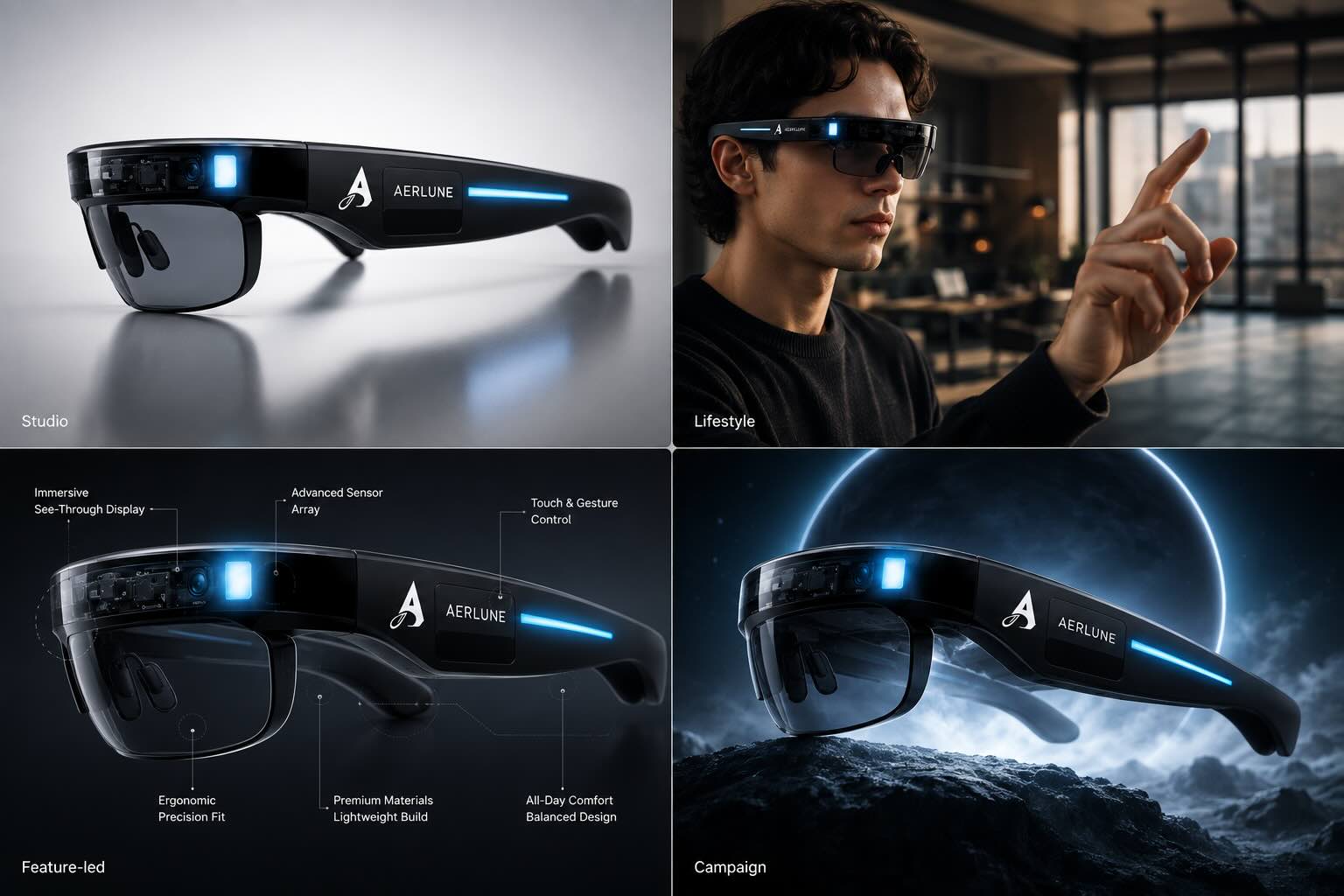
One ecommerce product transformed into studio lifestyle feature-led and campaign advertising images
One smart-glasses product across studio, lifestyle, feature-led, and campaign directions.

Studio Hero

Turn a basic product photo into a polished commercial visual with intentional lighting and composition.

Lifestyle Context

Place the product in a believable environment that gives shoppers context around who it is for and where it fits.

Feature-Led Creative

Build the visual around a material, ingredient, feature, differentiator, or use case.

Benefit-Led Creative

Make the desired customer outcome the center of the composition.

Performance Variation

Take one promising concept and explore different layouts, audiences, hooks, and settings.

Seasonal Direction

Reframe the same SKU for a launch, event, promotion, season, or campaign moment.

Product Transform demo

Watch one product become a new commercial direction.

Start with the source product image. Define the direction. Generate a polished product visual. Then repeat the process for the next audience, context, placement, or hypothesis.

From idea to direction

You should not need to speak fluent prompt engineering to make a good ad.

“Make this premium.” “Put this product in a kitchen.” “Create an energetic launch video.” These are understandable creative ideas, but generative models often need more production detail.

Prompt Optimizer develops the instruction while preserving the things you actually care about. Depending on the task, it can add direction around composition, lighting, styling, camera movement, timing, motion, transitions, continuity, and atmosphere.

Review the optimized prompt before generating. You remain the director. The prompt becomes the production brief.

Prompt Optimizer costs 1 credit per optimization.
Test directions, not just designs

More creative output only matters when the variations answer different questions.

Bad variationChange the background from blue to green.
Useful variationChange the hypothesis.

Test the hook

What earns the first second of attention?

Test the audience

Does the same product need a different visual context for a different buyer?

Test the benefit

Which outcome matters enough to make someone stop?

Test the mechanism

Can the visual explain why the product works differently?

Test the environment

Studio, lifestyle, aspirational, technical, playful, premium, or utilitarian?

Test the offer

Can the same product support different promotion or bundle presentations?

Test the format

Does the idea work better as a static image, short video, UGC-style concept, or demonstration?

Creative testing is not about producing the same idea 30 times. It is about putting 30 better questions in front of the market.

Static-first strategy

Find the direction before you spend more on the production.

Video can carry more information and motion, but that does not mean every creative hypothesis deserves to become a video immediately. Use static creative to compare sales messages, positioning angles, visual concepts, audiences, offers, and product contexts quickly.

When a direction looks worth taking further, turn the strongest frame into motion or build a complete product video around the concept.

Product
Static concepts
Strongest directions
Video iterations
When the idea deserves motion

Your strongest static creative can become the first frame of the next test.

Once the image is right, motion should support the idea rather than replace it. Use Image to Video to introduce movement while preserving the creative direction you already established.

  • Subtle commercial push-in
  • Rotating product reveal
  • Ingredient motion
  • Lifestyle movement
  • Hand interaction
  • Environmental animation
  • Camera pan
  • Product demonstration
  • Short-form hook
Built around how products are actually marketed

One creative workflow. Different ecommerce surfaces.

Meta Ads

Generate multiple product-led creative hypotheses for feeds, Stories, and performance campaigns.

Instagram & Reels

Create polished static directions, lifestyle visuals, and short-form motion from the same product.

TikTok

Explore attention-first visual concepts, product demonstrations, and short-form video ideas.

Amazon FBA

Build polished hero imagery and supporting product visuals around features, benefits, and use cases.

Google Demand Gen

Create product creative in useful campaign formats such as square and portrait placements.

Shopify & DTC

Produce product visuals for paid media, landing pages, launches, retargeting, and seasonal campaigns.

Agencies

Turn client products and references into presentable creative directions without rebuilding every concept manually.

Apparel, accessories & on-model creative

What if the product belongs on a person?

When the product itself is the hero, use Product Transform. When the creative depends on a person wearing, holding, or presenting the product, use Human Transformer.

Human Transformer can rebuild a still image around changes to clothing, pose, environment, lighting, product, and reference composition. It is particularly useful for apparel, jewellery, eyewear, accessories, fashion campaigns, and on-model ecommerce photography.

  • Clothing
  • Pose
  • Environment
  • Lighting
  • Product
  • Reference composition
On-model ecommerce creative showing a person wearing a product in a directed commercial frame
Use when the relationship between the person and product is part of the creative.
Why Truepix

Direct creative outcomes instead of chasing individual AI models.

AI creative production changes quickly. New image and video models arrive. One becomes good at product fidelity. Another becomes good at motion. Another fits a particular visual style.

Truepix is built as a creative orchestration layer. It can intelligently route work to appropriate underlying models while still allowing manual model choice when you want it.

The ecommerce operator should be deciding:What should we test next?

Not: “Which model dashboard do I need to learn this week?”

Stop fighting prompts. Start directing outcomes.
Product fidelity modelCommercial image modelMotion modelStyle-specific modelTruepix orchestration layerYour creative direction
What should I test?

12 ecommerce creative directions to generate from one product

01

Problem / Solution

Show the customer problem before positioning the product as the resolution.

02

Feature Close-Up

Build the entire visual around one differentiating feature.

03

Benefit Visualization

Turn an abstract benefit into something visible.

04

Lifestyle Context

Show the environment where the product naturally belongs.

05

Premium Studio

Elevate perceived value through controlled commercial presentation.

06

Comparison Concept

Explain a meaningful difference visually without relying on a wall of copy.

07

Ingredient / Material Story

Make the product’s composition part of the advertising idea.

08

Before / After

Use an appropriate transformation or contrast when the category supports it.

09

Use Case

Show exactly where, when, or why someone reaches for the product.

10

Audience-Specific Version

Reframe the same SKU around a different customer context.

11

Seasonal Campaign

Take the existing product into a new campaign moment.

12

Visual Metaphor

Represent the benefit with an unexpected visual concept instead of another generic product photograph.

Responsible reference use

Inspiration is useful. Imitation is risky.

Reverse engineering a reference should help you understand creative decisions—not reproduce somebody else's protected creative identity. A strong workflow replaces reference-specific elements with your own expression.

Study the system. Create your own expression.

  • Product
  • Logo
  • Copy
  • People
  • Imagery
  • Footage
  • Music
  • Brand colors
  • Offer
  • Design choices
A shorter path to testable creative

Blank prompt vs. creative workflow

Blank-prompt workflowTruepix creative workflow
Start from nothingStart from a product, reference, or idea
Manually describe visual structureReverse Engineer extracts the creative blueprint
Guess how much prompt detail is requiredPrompt Optimizer develops the direction
Generate one-off imagesProduct Transform creates multiple commercial directions
Switch tools as the idea evolvesMove from still to video inside one creative stack
Focus on learning modelsFocus on deciding what to test
Regenerate everythingIterate on the part of the workflow that needs changing

The point is not more AI. The point is a shorter distance between an idea and a testable creative.

FAQ

Frequently asked questions about AI ecommerce ad creative

What is an AI ecommerce ad creative generator?

An AI ecommerce ad creative generator helps turn product information, product images, or creative direction into advertising visuals. Depending on the workflow, this can include product photography, lifestyle imagery, static ads, campaign concepts, and video.

Truepix connects reference analysis, prompt development, product transformation, and video creation inside the same creative workflow.

Can I create ecommerce ads from a product photo?

Yes. With Product Transform, you can start from a clear product image and place that product into different commercial scenes, layouts, and campaign directions.

This can include studio imagery, lifestyle settings, feature-led concepts, and paid-social creative variations.

Explore the AI product ad generator →
Can Truepix analyze competitor ads?

Reverse Engineer can analyze an image or video reference and identify creative structure such as composition, lighting, typography placement, pacing, camera movement, and editable variables.

The intended workflow is to understand the structure and then replace reference-specific elements with your own product, brand, audience, and creative choices.

Reverse engineer an ad →
Is Reverse Engineer the same as copying a competitor ad?

No. The goal is to identify the underlying creative decisions and turn them into a new brief.

Do not duplicate another brand’s logo, product, copy, characters, footage, or distinctive creative expression. Use the structure as learning and build the execution around your own brand.

Can Truepix generate new ad ideas rather than starting from competitor ads?

Yes. You can begin with your own product, audience, benefit, offer, or campaign idea.

Prompt Optimizer can expand a short direction into a more detailed prompt and suggest alternative creative approaches. You can then use Product Transform or the appropriate image or video workflow to generate those concepts.

How does Prompt Optimizer help ecommerce ads?

Prompt Optimizer turns a short or incomplete creative instruction into a clearer production-ready prompt.

Depending on the task, it can develop composition, lighting, camera direction, motion, pacing, and atmosphere while preserving important requirements from the original idea.

Try the AI Prompt Optimizer →
Should I create image ads or video ads first?

There is no universal rule. Static creative can be especially useful when you want to test multiple visual directions, messages, or audiences quickly.

Once you identify concepts worth developing further, turn the strongest frames into video or build a more complete video campaign around them.

Can I turn an ecommerce product image into video?

Yes. Once you have a finished product image, use Image to Video to introduce camera movement, product movement, environmental motion, or other animation while keeping the still as the visual starting point.

Explore Image to Video →
Is Truepix useful for Amazon sellers?

Yes. Product Transform can create commercial product imagery and supporting listing visuals from a source product image. It is also useful for exploring feature-led, use-case, and lifestyle directions around the same SKU.

Is Truepix useful for Shopify and DTC brands?

Yes. The workflow is particularly relevant when a brand needs a steady stream of product creatives for Meta, TikTok, Google, landing pages, launches, and organic social without organizing a new physical shoot for every concept.

Can agencies use Truepix for ecommerce clients?

Yes. Agencies can use Reverse Engineer to convert references into more structured creative briefs, Product Transform to generate product concepts, and Prompt Optimizer to clarify direction before production.

What if my ecommerce creative includes a model?

Use Human Transformer when a person is central to the frame. This is especially relevant for apparel, jewellery, eyewear, accessories, and other categories where the relationship between the person and product is part of the creative.

Explore Human Transformer →
Do I need to know which AI model to use?

Not necessarily. Truepix supports intelligent model selection so users do not have to follow every change in the image and video model landscape. Manual model selection remains available when you want specific control.

Can I try Truepix for free?

New users receive 70 free credits. A practical place to begin is Product Transform, Prompt Optimizer, or Reverse Engineer before moving into heavier video-generation workflows.

Start with 70 free credits →
Your next creative doesn't need to start from zero

Find the pattern. Make it yours. Test the next direction.

Bring the product you already have. Bring the reference you saved. Bring the rough idea sitting in your notes. Truepix turns those inputs into something you can actually direct, generate, and test.

70 free credits for new users.