Generate Your Own Characters, Products, and Visual Worlds — Consistently.
Generic AI models know a little about everything. Fine-tuning teaches one to recognize your subject. Upload 12–20 high-quality images, choose a unique trigger word, and Truepix automatically prepares and trains a LoRA fine-tune for you. No datasets to label. No model configuration. No technical setup.
Why generic AI eventually starts looking generic.
Base AI models are trained on enormous amounts of visual information. That is what makes them powerful. It is also why, when you ask for something specific enough times, they tend to drift toward familiar faces, familiar products, familiar aesthetics, and familiar visual clichés.
Prompting can push the model in a direction. But prompting alone does not make the model know your subject. Fine-tuning does. Instead of describing the same person, product, character, or visual identity from scratch every time, you give Truepix visual examples once and create a reusable trained model around them.
Prompting tells the model what you want. Fine-tuning teaches it what you mean.
Truepix uses your uploaded images to create a lightweight LoRA adaptation on top of an AI image model. Upload your images, choose a unique trigger word, and hit Train. Truepix analyzes and automatically captions the images, manages the underlying model setup, and handles the training process for you.
No prompt engineering degree required.
You shouldn't have to choose the right AI model first.
Most AI workflows begin with the wrong question: which model should I use? Truepix handles the underlying model selection and training setup automatically. Your job is to decide what you want to create — Truepix handles more of the technical complexity underneath.
Start a fine-tune →One trained subject. Endless creative directions.
A Person or Recurring Character
Keep the same recognizable identity across new outfits, environments, poses, and concepts.
Use it for: Campaigns, creator content, storytelling, recurring characters, and visual series.Your Product
Teach the model what your product actually looks like, then place it into new creative environments and campaign concepts.
Use it for: Product imagery, creative testing, concept exploration, and marketing visuals.A Mascot or Original Character
Turn a character from a one-off image into a reusable creative asset.
Use it for: Branded content, story worlds, social campaigns, and recurring creative formats.A Distinct Visual Subject or Style
Train around a consistent visual identity when prompting alone struggles to preserve it.
Use it for: Recurring aesthetics, illustration concepts, branded worlds, and visual experimentation.Not every image needs a trained model.
Fine-tuning matters when the same subject needs to survive across many generations. You stop recreating identity every time you open the generator.
Use prompting
When you are exploring ideas and identity consistency does not matter.
Use a reference image
When you need to guide the look of a single generation.
Use Human Transformer
When you want to change one existing image — clothing, pose, environment, lighting, or background.
Use Fine-Tuning
When the same subject needs to survive across many generations. That is the real advantage.
Your training set matters more than you think.
Better inputs create a more useful trained model. For best results, upload 12–20 high-quality images of the same subject. 1024 × 1024 is recommended. Aim for consistency in identity while giving the model enough visual information to understand the subject from different perspectives.
Include
- Clear, high-resolution images
- Multiple angles
- Different poses or viewpoints
- Some variation in lighting
- Some variation in backgrounds
- A clearly visible, consistent subject
Avoid
- Blurry or low-resolution images
- Near-identical duplicate photos
- Images where the subject is difficult to see
- Heavy filters that distort the subject
- Mixing different people, products, or identities in one set
- Every image using exactly the same angle or lighting
The goal is simple: same identity, enough visual variety to understand it. Truepix automatically analyzes and captions your images during the training process.
How to train your model in Truepix.
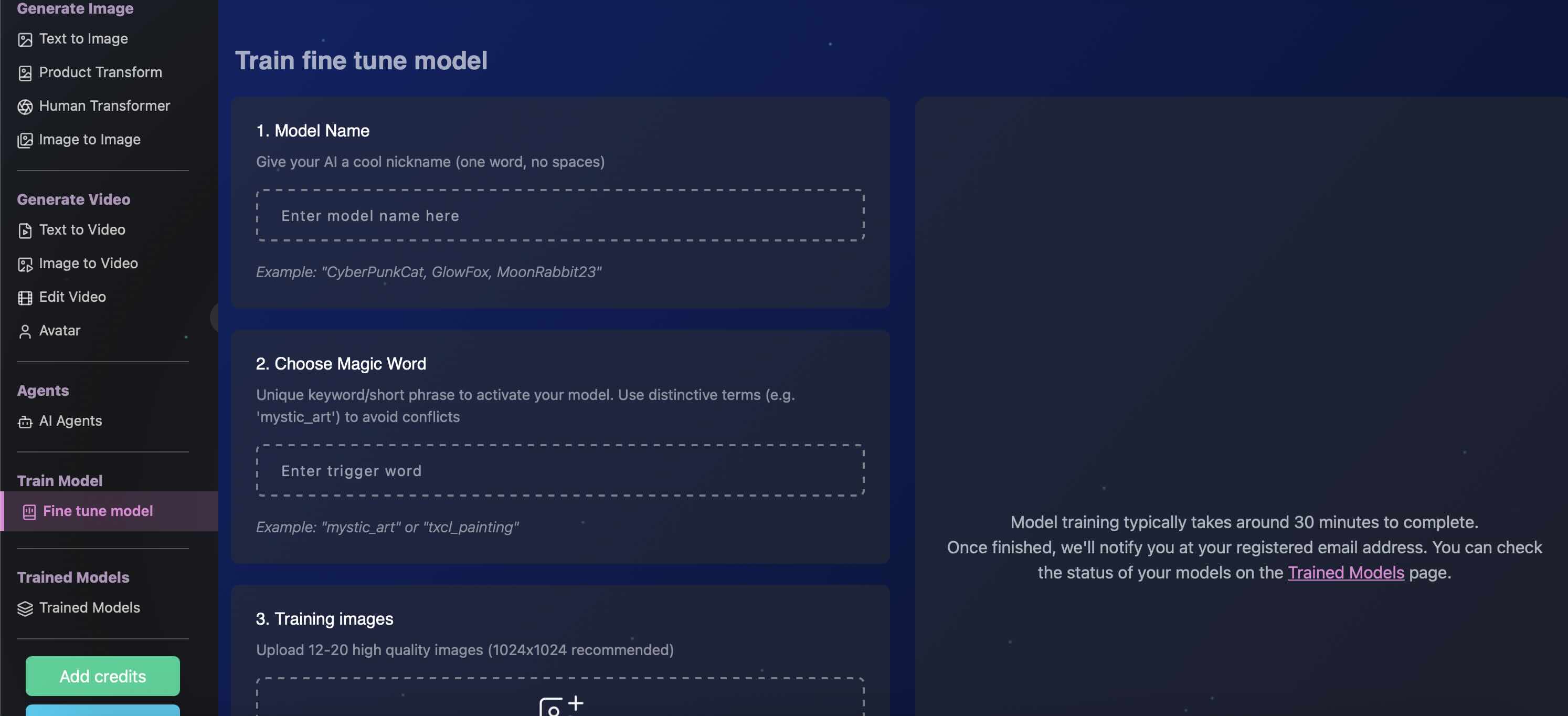
Upload the dataset, pick a trigger word, and let Truepix handle captioning, configuration, and the LoRA training run.
Start a new model from the Fine-Tuning section.
Create a distinctive keyword or short phrase that will activate your trained subject, such as mystic_art. Avoid common words the base model already understands.
Add high-quality images of the subject you want the model to learn. 1024 × 1024 is recommended.
Truepix automatically analyzes and captions your images. You do not need to manually label every file.
Truepix manages the underlying model configuration and starts the LoRA training process.
Most models are ready in roughly 15–30 minutes, although processing times can vary. You can leave the page while training continues.
Truepix sends you an email when your trained model is ready.
Your model stays available in your Trained Models section for reuse.
Include the trigger inside your prompt: mystic_art wearing a black tailored suit, standing inside a cinematic hotel lobby.
Change environments, styling, composition, and lighting while keeping your trained subject at the center of the idea.
Train once. Create far beyond the first image.
Your trained model stays available inside your Trained Models section, ready for future generations. Create an image using your trained subject, then use that image as the starting point for video generation inside Truepix.
A recurring character can become a scene. A product can move from a static concept into motion. A trained identity can become the foundation for an entire visual campaign. Fine-tuning is not just about getting one accurate image — it gives you a more consistent starting point for everything that comes after it.

Anyone can rent the same model. Nobody else can have yours.
The underlying AI models are available to everyone. Your advantage comes from what you teach them. A trained adaptation turns your own visual material into a reusable creative asset. Instead of beginning every project with another long description of the same subject, you start with a model that already recognizes it.
You are no longer trying to convince a generic model what your world looks like. You are directing one that has already learned it.
Permission first
For real-person likenesses, only upload images of yourself or people whose permission you have to use for training.
Images are not retained
Truepix does not retain the images you upload for training after the training process.
Ready in 15–30 minutes
Training runs in the background and Truepix emails you the moment your model is ready to use.
Before you train your first model.
What is a LoRA?
A LoRA is a lightweight way of teaching an existing AI model new visual information without retraining the entire underlying model. In Truepix, it allows the system to learn a specific person, product, character, or visual subject from your images.
How many images do I need?
We recommend uploading 12–20 high-quality images. Using clear images with several angles and some variation in pose, lighting, and background generally gives the model more information about your subject.
What image resolution should I use?
1024 × 1024 is recommended. Higher-quality, clearly framed source images generally provide better training material than compressed or blurry photos.
Can I train a model on my own face?
Yes. Upload a consistent set of clear photographs of yourself from multiple angles. If you are training on another person’s likeness, make sure you have their permission to do so.
Can I fine-tune a model on a product?
Yes. Upload clear images that accurately represent the same product. Using multiple views helps the model better understand its appearance when generating new creative concepts.
How is fine-tuning different from using a reference image?
A reference image helps guide an individual generation. Fine-tuning creates a reusable trained adaptation that can recognize the subject across future prompts and generations. If you need the same identity repeatedly, fine-tuning is the stronger workflow.
What is a trigger word?
A trigger word is the unique keyword or short phrase you choose while training your model. You include it in future prompts to tell the generator to use your trained subject. Choose something distinctive, such as mystic_art, rather than a common word.
Do I need to caption my training images?
No. Truepix analyzes and automatically captions your uploaded images as part of the training process.
How long does training take?
Training typically takes around 15–30 minutes, depending on processing conditions. Truepix will email you when your model is ready.
Are my uploaded training images saved?
Truepix does not retain the images you provide for training after the training process.
Does my trained model expire?
There is currently no expiration period. Your trained model remains available inside your Trained Models section for future use.
Can I create videos with my trained model?
Your trained model currently generates images from text inside the Trained Models section. You can then take those generated images into Truepix’s video generation tools to bring them to life.
Stop fighting prompts. Start directing outcomes.
Fine-tuning is useful when your creative work depends on something generic models cannot reliably invent again: your person, your product, your character, your visual world. Upload 12–20 images, give it a trigger word, and let Truepix train the model — then stop rebuilding the same identity from zero every time you create.