
Published: 2026-09-06 19:51:56 UTC
If you're evaluating Pletor, you're probably not shopping for a generator. You've already accepted that AI can make the image. What you're actually choosing is how much you want to build before you get one.
That's the fork this page is about. Below is an honest look at Pletor, Flora and Truepix AI for apparel, eyewear and product imagery — what each platform asks you to set up first, what each includes, and where each one is genuinely the better call. Competitor details are taken from their public sites and pricing pages as of September 2026. This is not a head-to-head output test, so where we haven't measured something, we don't claim it.
Pletor is creative infrastructure. You configure flows, encode a brand brain, and run batches across a catalogue. Strong for teams with an operator who enjoys building systems.
Flora is an infinite canvas. Every model in one workspace, node by node. Strong for concepting, moodboards and exploration.
Truepix AI skips the build step. You upload a reference frame, the creative decisions inside it come back as editable variables, and you swap in your model and your product. Strong for apparel, eyewear and product brands who need frames this week.
| Truepix AI | Pletor | Flora | |
|---|---|---|---|
| Core model | Agents and templates that return finished assets | Flows, agents and a brand brain you configure | Infinite canvas, node-based |
| Setup before your first asset | Upload one image | Build a flow, or run their copilot | Wire the canvas |
| On-model imagery | Human Transformer — reference in, campaign frame out | Via flows and pose systems you assemble | Fashion Studio, canvas-driven |
| Persistent brand memory | Autofill from Brand Profile | Pletor Brain | Techniques library |
| batch | Yes | Yes, Batch mode | Workflow-based |
| Finished video ad from a product | ADS Agent — script, voiceover, music, edit | Build the pipeline | Build the pipeline |
| Free tier | 70 credits | 200 starter credits | Free plan available |
| Entry price | $20/mo Pro | $19/mo Starter | See their pricing page |
| Best for | Brands who want the asset | Teams building a system | Teams exploring directions |
Competitor details taken from public sites and pricing pages, September 2026. Verify pricing before relying on it.
Worth saying up front, because you'll find it out anyway.
Pletor's Brain is a real idea. You encode tone of voice, visual identity, guidelines and past winners once, and every subsequent run draws on that context. If your problem is re-explaining your brand to a model every single session, that solves it.
Batch mode is the other one. Upload a Shopify export or a folder of packshots, run one workflow across the whole set, review in one place. If you're refreshing 300 PDP images, that is built for exactly your problem. If catalogue-scale is your bottleneck this quarter, take Pletor seriously.
That's a real product. Now here's the part worth thinking about before you commit.
Pletor's own pricing page names its middle tier "Builder — For Creative Engineers doing client work."
That's not a criticism. It's an accurate description of who the product rewards. The platform is designed as infrastructure, and infrastructure has a setup cost: you configure the flow, you encode the brain, you connect the sources, you tune it. Once it runs, it runs well.
The question is whether you have that person, and whether the job you're doing justifies the build.
Because there's a version of creative work that never reaches steady state. A drop lands, you need eight on-model frames by Thursday, three of them for a colourway that didn't exist last week. The next drop has different garments, a different mood, a different reference board. You're not running a pipeline. You're answering a brief.
Production used to punish experimentation. If the setup cost of trying an idea is an afternoon of wiring, most ideas don't get tried.
Here's the thing every apparel founder already has and never uses.
A board full of saved poses. Editorial frames, campaign shots, a folder of exactly the energy you want. Hundreds of references, and no realistic path from any of them to your own product page.
That board is a brief nobody wrote down. Human Transformer reads it.
You upload the reference. Truepix reverse-engineers the human decisions inside the frame — how the body is angled, where the weight sits, where the eyes go, how hard the light is, how the colour is graded, what the environment is saying — and hands all of it back as an editable template with every changeable element mapped to a variable.
Then you swap the variables. Different model. Your garment. Your frames on her face. Concrete backdrop becomes a sunlit studio wall. Keep the pose, keep the light, keep the grade. Generate.
There's no flow to build first. The reference is the flow.
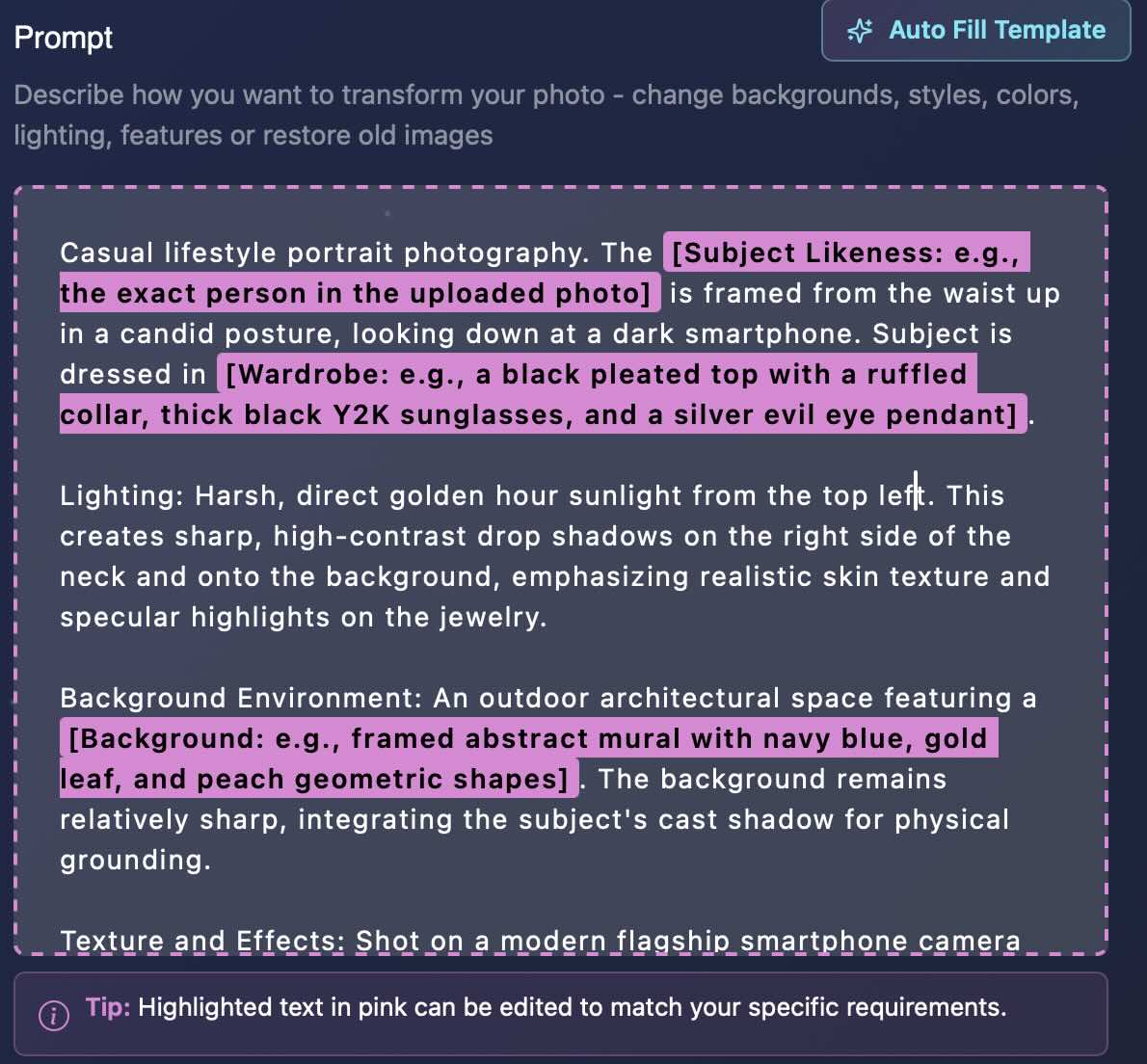
What Truepix reads in the subject:
What Truepix reads in the frame:
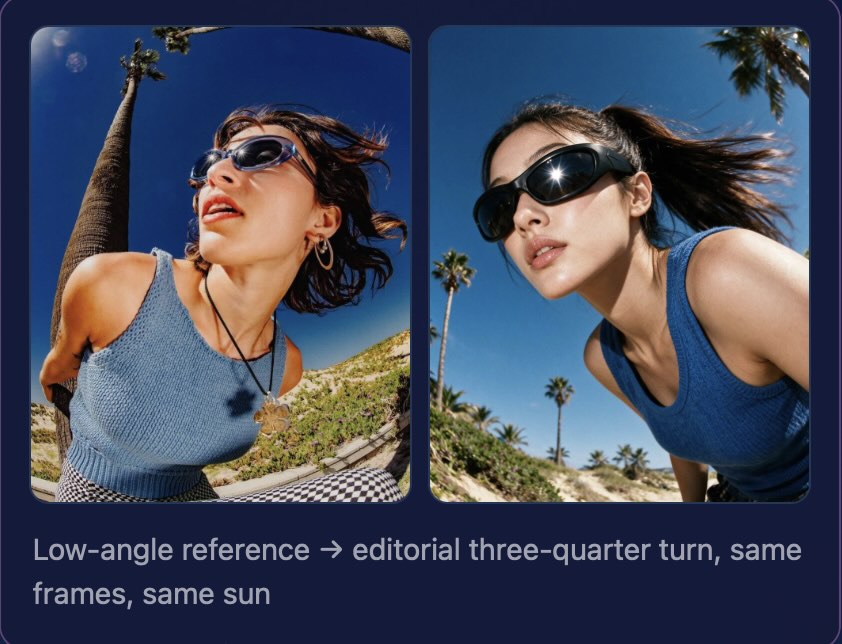
→ See how Human Transformer works
The workflow below is Reverse Engineer, which is the same Create Template mechanic Human Transformer runs on. Watch a reference image get broken into editable variables, then picture the variables as your model, your garment and your pose.
If you'd rather read it: the reference goes in, Truepix maps its composition, lighting, styling and grade into labelled variables, you edit only what should change, and generate. The template stays intact afterward, so the next colourway is a variable swap rather than a fresh start. More on the mechanic in Turn Any Image Into an Ad Creative.
The usual objection to reference-driven generation is that you still need to write a good prompt. You don't.
Prompt Optimizer takes a short or vague idea and expands it into a production-ready one, filling in composition, lighting, camera direction, style and atmosphere. It shows you the optimized version next to your original before anything generates, preserves your stated requirements, suggests alternative creative directions, and costs one credit per run.
Autofill goes further. Paste your Brand Profile and the AI populates every variable in the template with your own details, so a reference frame becomes your frame without touching a variable by hand.The Brand Profile persists across sessions.
Every person in a Truepix frame is generated, not licensed stock talent with a contract expiry attached.
No day rates. No agency fees or travel. No usage window quietly expiring mid-campaign. No renewal email in month seven asking whether you'd like to keep running the ad that's working.
The practical consequence is casting. You can build a cast that actually looks like your customers — different ages, body types, skin tones, markets — across the same garment and the same pose, in one afternoon. Show the same jacket on four different people and let the ad account tell you which one converts.
One limit worth stating: generated people are for building your own creative. Recreating a real, identifiable person's likeness without permission is out of bounds, including in a "similar style" frame.
Human Transformer produces stills. Send the finished frame through Image to Video and the same shot turns, walks or breathes for Reels and TikTok.
For a full video advertisement — script, AI voiceover, copyright-free music, edit, all composed — that's the ADS Agent, built for tangible products. It isn't the right tool for SaaS or services, and we'd rather tell you that now than after you've signed up.
Pick Pletor if you have someone who builds systems, your bottleneck is running the same process across hundreds of SKUs, and you want brand context encoded once and reused everywhere.
Pick Flora if your work is upstream — concepting, moodboards, exploring directions across many models on one canvas — and the deliverable is a direction, not a product page.
Pick Truepix if you have a board full of references and no path from them to your own product, if your calendar needs new angles weekly rather than a quarterly catalogue refresh, and if you'd rather spend the afternoon choosing between six frames than building the thing that makes them.
Most apparel teams end up running Human Transformer for on-model frames, Product Transform for hero and flat shots, Image to Video for social, then handing the winners to the ADS Agent.
It depends on which job you're doing. Pletor is built as configurable infrastructure with a brand brain and catalogue batch processing. Truepix is built to return finished assets from a single input, with no flow to assemble first. Teams needing catalogue-scale batch should look at Pletor. Teams needing on-model frames from a reference this week should look at Truepix.
Both are canvas and workflow-driven platforms with access to many underlying models. Flora leans toward concepting and exploration on an infinite canvas. Pletor leans toward production infrastructure with brand memory, batch runs and API access.
Their public pricing starts at $19/mo for 1,000 credits, $49/mo for 3,000, and $199/mo for 15,000, with a custom enterprise tier and 200 free starter credits. Credit cost per generation varies by model. Check their pricing page for current figures.
No. Human Transformer extracts the creative decisions from a reference image into editable variables, and Prompt Optimizer expands a rough idea into a production-ready prompt for one credit, showing you the result before anything generates.
Yes. That's the core workflow for apparel, eyewear, jewellery and accessories: keep the pose and the light from your reference, replace the garment or product, generate the frame.
The people Truepix generates aren't licensed stock talent, so there's no day rate, usage window or renewal to track. Recreating a real, identifiable person's likeness without their permission isn't supported.
Yes. Human Transformer produces stills, then Image to Video adds the motion — a turn, a walk, or a subtle push-in for Reels, TikTok or a product page loop built from the exact shot you directed.
Yes. New accounts start with 70 free credits. That isn't enough for a full video ad, and we won't pretend otherwise. Human Transformer and image generation are the best places to spend them — upload one reference, rebuild one shot, and judge the leap yourself.
Both approaches are legitimate. If your bottleneck is repetition at catalogue scale and you have someone who enjoys building the machine, an infrastructure platform will reward that investment. If your bottleneck is that every good reference you save is a shoot you can't afford to book, the build step is the thing standing between you and the work.
New Truepix accounts start with 70 free credits. That's not enough for a video ad, and we won't pretend otherwise. It's enough to do the one thing that actually settles this: upload the reference you've been staring at, rebuild it with your product in the frame, and judge the leap yourself.