Published: 2026-09-16 20:31:03 UTC
Creating an AI microdrama is no longer about generating a few impressive clips and hoping they cut together. The real challenge is continuity: keeping the same character recognizable across scenes, preserving locations, controlling camera movement, timing dialogue correctly, and maintaining enough narrative momentum that viewers want the next episode. In this guide, you will learn how to create a 1-minute AI microdrama using a reference-led workflow in Truepix AI, from character sheets and environment references to cinematography, dialogue, image-to-video generation, editing, and final 9:16 delivery.
An AI microdrama is a short, story-driven video created partly or entirely with generative AI. Episodes are commonly designed for vertical viewing and use fast pacing, recognizable characters, emotional conflict, reveals, and cliffhangers to keep viewers watching.
Unlike a standalone AI video, a microdrama depends on continuity across multiple shots. The same protagonist may appear in a close-up, a two-person dialogue scene, an exterior sequence, and an emotional reaction shot. Their face, hairstyle, wardrobe, environment, and overall visual identity need to remain believable throughout.
AI microdramas can be published on platforms such as TikTok, Instagram Reels, YouTube Shorts, and dedicated vertical-drama services. They can cover familiar genres such as romance, thriller, horror, fantasy, comedy, revenge, family conflict, and science fiction, while AI also makes it practical to create stories involving impossible environments, talking animals, animated objects, surreal worlds, and characters that would be expensive to produce conventionally.
Short-form vertical storytelling has developed into its own entertainment category. Dedicated microdrama platforms, social video platforms, and AI-native storytelling tools are increasingly competing for audiences who are comfortable watching serialized stories one short episode at a time.
The attraction for creators is straightforward: traditional production makes experimentation expensive. Every additional location, actor, costume, reshoot, or camera setup adds cost. Generative AI changes that relationship. A creator can test different characters, visual worlds, genres, hooks, and endings before committing to a large production.
The opportunity is not simply to imitate conventional television at lower cost. AI makes it possible to create stories that would otherwise be difficult to shoot at all: a civilization inside a refrigerator, a detective story starring a stray cat, a romance taking place on Mars, or a recurring fantasy world that exists entirely through generated environments.
A practical production workflow is: Story → Reference → Character Sheet → Environment → Shot List → Camera Direction → Image to Video → Dialogue → Music → Edit → Publish.
The important shift is to stop treating the video model as a one-click filmmaker. You make the creative decisions first and use AI to execute individual parts of the production.
Truepix AI is built around this kind of orchestration. You can create reference images, generate character sheets, use image-to-video models, add camera instructions, optimize prompts, generate speech and music, reverse engineer short-form video structures, and selectively edit generated video when one element needs to change.
A one-minute microdrama does not need an enormous plot. It needs an immediate problem that creates curiosity.
A weak opening might be: Sarah moved to New York three years ago and works at a law firm. A stronger opening would be: Why is my dead sister calling your phone?
The second version creates unanswered questions immediately. Who is calling? Why does the other character have the phone? Is the sister really dead? The viewer now has a reason to stay.
Before creating any visuals, write the central dramatic question of the episode in one sentence. If the question is not interesting, better cinematography will not fix the story.
There is no mandatory formula for a one-minute microdrama, but the following structure is a useful starting point.
0–3 seconds — Hook: Enter during the interesting moment. Show conflict, an unusual visual, a surprising line, or an unanswered question immediately.
3–15 seconds — Context: Give viewers only enough information to understand the current problem. Avoid lengthy exposition.
15–35 seconds — Escalation: Introduce a complication. Someone lies, a message arrives, an unexpected person enters, or the protagonist discovers something new.
35–50 seconds — Reversal: Change what the viewer believes about the situation. A trusted character becomes suspicious, the apparent victim gains control, or new information changes the meaning of an earlier scene.
50–60 seconds — Cliffhanger: Finish with a new question rather than an explanation. The final image or line should make Episode 2 feel necessary.
You do not have to invent every pacing decision from a blank page. If you find a Reel, Short, microdrama scene, hook, product reveal, or piece of your own previous work with a structure you like, you can study the underlying creative mechanics.
With Truepix Reverse Engineer, you can upload a reference video and analyze elements such as shot timing, camera movement, framing, pacing, dialogue timing, hook architecture, visual beats, and transitions.
The objective is not to copy the original characters or creative expression. The useful part is the structure. A reference might reveal a rhythm such as: extreme close-up for two seconds, reaction shot for three seconds, handheld reveal for four seconds, then a slow push-in during dialogue.
You can reuse that structural logic while replacing the story, actors, locations, dialogue, visual style, and creative identity with your own.
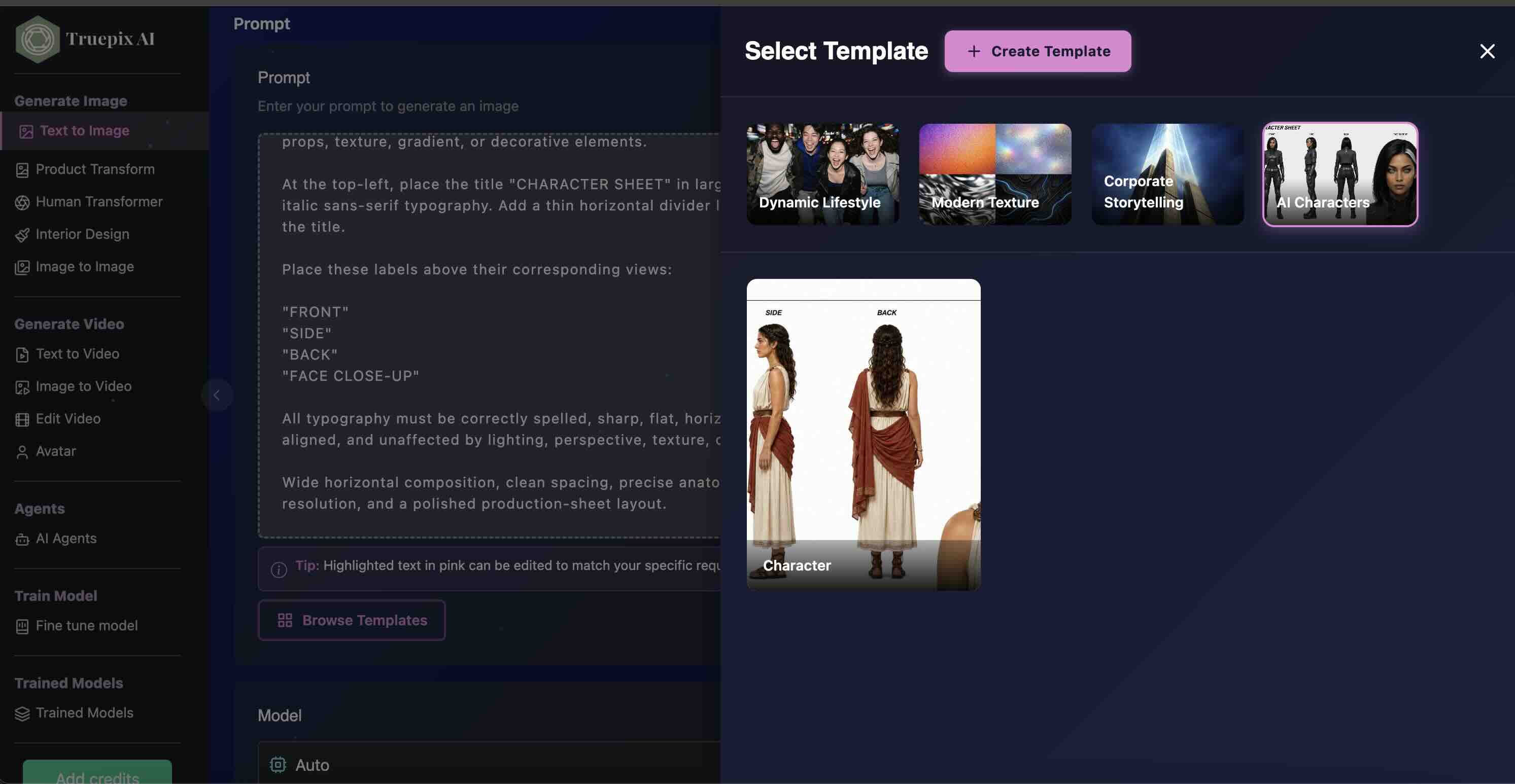
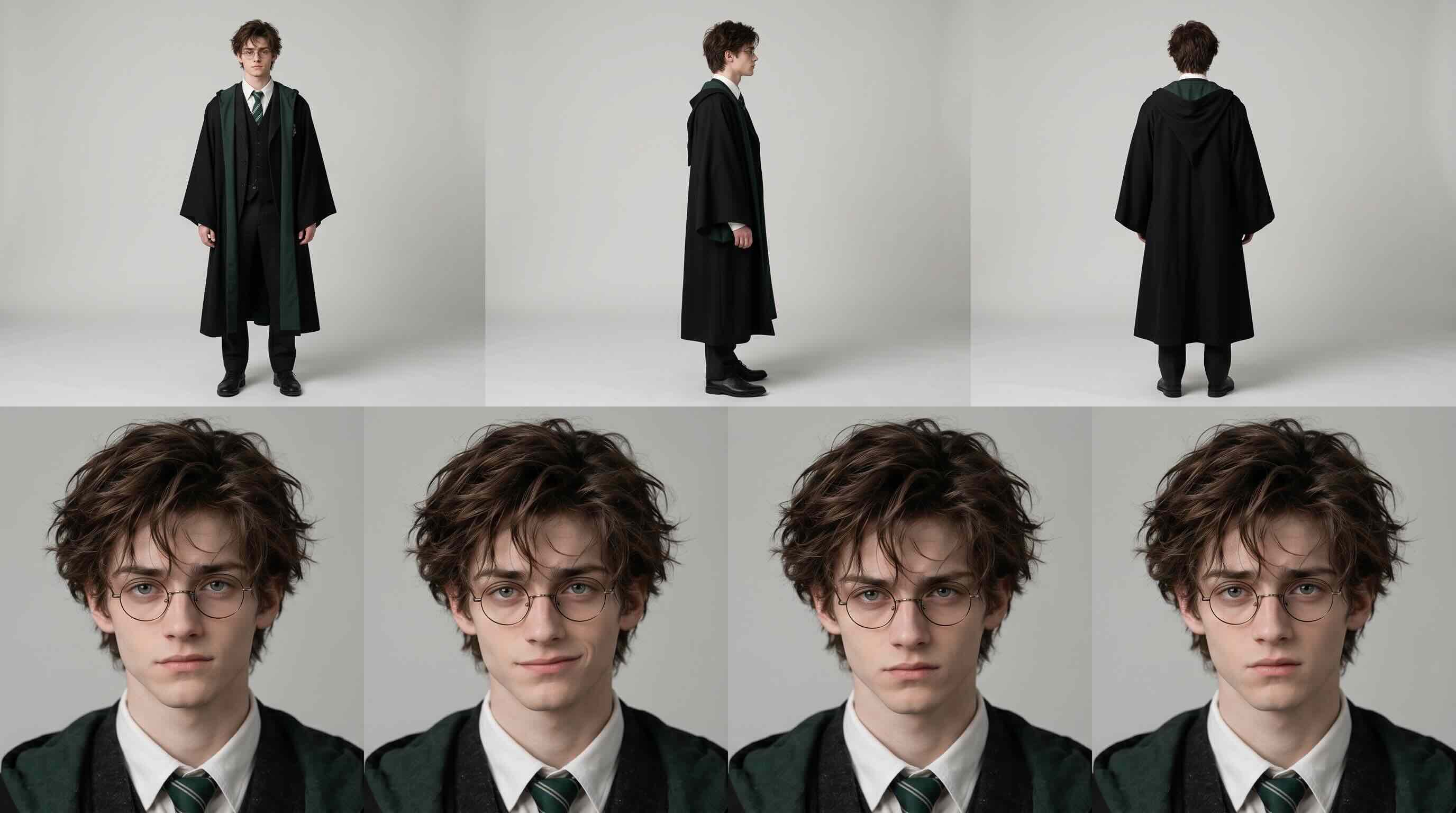

Already have a character reference? Use Image to Image in Truepix AI: upload the reference image(s), paste the corresponding character-sheet prompt, and generate the turnaround. Starting from scratch? Choose Text to Image and generate the character using a written description. Click either example image to view it at full size.
Don't want to write these long prompts yourself? Try our open-source Character Sheet Director. Describe a character, share a story, or provide reference images, and the Skill helps you generate a structured character-sheet prompt with consistent appearances, front/side/back views, and expressions. Copy the result into Truepix AI's Text to Image or Image to Image workflow.
Character consistency is one of the most important parts of AI microdrama production. Recreating your protagonist from a fresh text prompt in every scene increases the chance that their face, hair, age, clothes, or proportions will drift.
Instead, create the character once. In Truepix AI, you can use the Character Sheet template with Text to Image, or begin with an existing character image and use Image to Image.
A useful character sheet can establish the character's face, hairstyle, age range, body proportions, wardrobe, front view, three-quarter view, side profile, full-body appearance, and important expressions.
Think of this step as casting. Once you approve the actor, reuse that visual identity throughout the production rather than recasting the character with words every time.
Keeping the actor consistent is only half of the continuity problem. A recurring apartment, restaurant, office, hospital, or street also needs a stable visual identity.
Imagine that the first shot establishes dark green kitchen cabinets, brass pendant lights, a white marble island, and a large window behind the dining table. If the next generation changes the cabinets to wood and replaces the window with a wall, the audience may immediately feel that something is wrong.
Create or approve a reference image for every important recurring environment. When generating the scene, provide the character sheet and the environment reference together.
Your reference images now answer two critical questions for the model: Who is in this scene? and Where is this scene taking place?
For greater control, do not treat the complete one-minute screenplay as one giant video prompt. Convert the story into a sequence of shots.
Example Shot 1 — 0–5 seconds: Extreme close-up of a phone vibrating on a kitchen counter. The caller ID reads MOM. The protagonist reaches for it and freezes.
Example Shot 2 — 5–11 seconds: Medium close-up of the protagonist staring at the screen. Slow camera push-in.
Example Shot 3 — 11–18 seconds: Over-the-shoulder shot as her husband enters behind her. She quickly hides the phone.
Example Shot 4 — 18–26 seconds: Natural dialogue framing. He asks why she looks frightened.
Generating separate shots gives you control over pacing and makes corrections easier. If one five-second scene fails, you can regenerate or edit that scene instead of rebuilding the entire episode.
AI video models can respond to cinematography instructions such as shot size, camera motion, depth of field, and lens-style language. You can provide these instructions directly in Truepix or write a simpler idea and use Prompt Optimizer to expand it with camera, lighting, composition, style, and atmosphere.
24–28mm-style wide shot: Useful when the environment matters. Example: 24mm wide vertical establishing shot of an empty luxury penthouse, camera slowly moving through the doorway.
35mm-style shot: Useful for movement, two-person compositions, and scenes where the environment should remain visible. Example: 35mm handheld tracking shot following her through the restaurant.
50mm-style framing: A strong starting point for natural dialogue and medium close-ups. Example: 50mm medium close-up with a subtle slow dolly toward the character as he realizes she knows the truth.
75–85mm-style close-up: Useful for emotional reactions, reveals, and intimate performance. Example: 85mm emotional close-up, shallow depth of field, eyes fixed on the person opposite her.
These lens values should be treated as visual direction rather than a guarantee that an AI system perfectly reproduces the physical optics of a real cinema lens. Their purpose is to communicate the desired photographic language.
You do not need to know filmmaking terminology before creating your first AI microdrama.
You can write a simple creative instruction such as: She discovers that the person sitting across from her is actually her missing brother. Make the reveal tense and intimate.
Truepix Prompt Optimizer can expand a short idea into a more detailed prompt by adding useful information around composition, lighting, camera direction, visual style, and atmosphere while preserving the important requirements in your original request.
This allows beginners to think in terms of story intention, while creators who already understand cinematography can still provide exact technical direction.
Once your character and environment references are ready, move into Image to Video.
Attach the relevant character sheet and environment reference, then describe the action, performance, dialogue, framing, and camera movement required for that specific shot.
Truepix gives you access to video-generation workflows through an easy interface and can route creative tasks through suitable underlying models. Models such as Seedance 2.5 can be used for reference-led video generation where character continuity, camera direction, dialogue, and lip synchronization are important.
At this stage, stop thinking like someone requesting a random AI clip. Think like a director giving instructions for one shot.
Some scenes need stronger visual constraints than a single reference image. Truepix Image to Video supports workflows where you can provide a first frame, a last frame, or additional reference imagery.
For example, the first frame might show your protagonist standing outside a closed elevator. The last frame might show the elevator open while the protagonist stares at the person inside.
The generation model now has visual anchors for where the shot starts and where it should end.
First-frame and last-frame control can be useful for reveals, character entrances, door openings, camera moves, before-and-after compositions, controlled transitions, and scenes that need to connect cleanly with the following edit.
Dialogue does not always require a completely separate animation pipeline. Models such as Seedance 2.5 can support spoken dialogue and lip synchronization during video generation.
When directing the scene, specify who speaks, what they say, approximately when they say it, how they deliver the line, and what the camera is doing during the dialogue.
For example: Vertical 9:16 medium close-up. Keep the woman identical to the supplied character reference and preserve the supplied apartment environment. She looks toward the doorway, frightened but trying to hide it. Slow 50mm-style push-in. At approximately 3 seconds she quietly says, 'You were not supposed to find me.' Hold on her reaction after the line.
Dialogue can also be created in different languages, making the same workflow useful for localized microdrama production.
Audio is part of storytelling, not an afterthought. Truepix provides tools for generating speech and music, while some underlying video models can also produce synchronized spoken dialogue directly within a generated scene.
Use music to support tension rather than covering every second of the episode. Silence before a reveal can be more powerful than another dramatic cue.
Consider recurring audio ideas across episodes as well. A specific musical phrase, voice treatment, or sonic motif can help make a character or storyline recognizable.
AI video generation is often iterative. Sometimes the camera movement is right, the timing is right, the lighting is right, and the location is right, but one character is incorrect.
Truepix Edit Video allows you to provide an existing video together with reference imagery and make targeted visual changes. For example, you can change or replace a character while preserving the useful structure of the existing scene.
This creates a more efficient production philosophy: keep what worked and change what did not.
Selective editing is especially useful in serialized storytelling because regenerating a successful shot from scratch can introduce new continuity problems.
Generate and refine your controlled shots in Truepix, then assemble the finished one-minute episode in a dedicated video editor such as CapCut or Adobe Premiere Pro.
A traditional editor gives you precise control over cut timing, dialogue spacing, music levels, captions, transitions, speed changes, final color adjustments, and delivery settings.
AI generation and timeline editing solve different problems. Use Truepix for creating and controlling the scenes, then use a dedicated editor for final assembly.
Most social microdramas are consumed vertically, which changes how scenes should be composed.
A beautiful wide establishing shot may work in 16:9 cinema but become visually weak when viewed on a phone. Faces, reactions, objects, and spatial relationships need to remain readable inside a narrow frame.
Instead of spending six seconds showing an entire mansion, establish wealth through faster details: a marble floor, an expensive watch, a chandelier, an elevator that opens directly into the apartment, followed by the protagonist's reaction.
Use wide shots deliberately. Use close-ups when emotion matters. Design for the screen your audience will actually be holding.
A useful way to structure AI microdrama prompts is: Reference → Framing → Action → Performance → Dialogue → Camera → Ending.
Example: Use the supplied character sheet as the identity reference and the supplied apartment image as the environment reference. Vertical 9:16 medium close-up. The protagonist enters slowly and notices an envelope on the kitchen counter. She stops immediately and her confidence disappears. At approximately 4 seconds she whispers, 'He knows where I live.' Slow 50mm-style dolly in during the dialogue. Preserve her face, hairstyle, wardrobe, and the apartment layout throughout the shot. End with her looking toward the front door.
This structure gives the generation model clear answers to the most important questions: who is present, where the scene takes place, what happens, how the performance should feel, what is said, how the camera moves, and how the shot should end.
Do not generate 50 episodes simply because you have written 50 scripts. Start with Episode 1 and learn from the audience.
Track signals such as first-three-second retention, average watch duration, completion rate, rewatches, shares, comments, profile visits, and whether viewers actively ask for the next episode.
If people understand the opening but leave halfway through, pacing may be the problem. If viewers repeatedly mention a supporting character, that character may deserve more importance. If the cliffhanger produces comments asking for Part 2, you have evidence that the story engine is working.
AI makes iteration cheaper. Use that advantage before committing to the full series.
Romance: secret relationships, reunions, betrayal, forbidden love, hidden identities, and relationship reversals.
Thriller: missing people, surveillance, suspicious messages, hidden rooms, mysterious callers, and mistaken identities.
Horror: haunted apartments, uncanny characters, supernatural objects, cursed recordings, and impossible events.
Fantasy: magical worlds, creatures, alternate histories, supernatural families, and impossible cities.
Science fiction: synthetic humans, memory transfer, simulated worlds, future workplaces, alien encounters, and artificial consciousness.
Comedy: escalating misunderstandings, absurd characters, workplace situations, relationship conflicts, and exaggerated everyday problems.
AI-native stories: talking animals, emotional household objects, miniature civilizations, surreal characters, and environments that would be impractical to produce physically.
AI microdrama does not have to become a cheaper imitation of conventional television. Its most interesting creative territory may be the stories traditional production would struggle to make at all.
The simplest rule is: stop recreating important characters from words alone.
Create a character sheet once, approve it, and reuse it as a visual reference during Image to Video generation. Apply the same principle to recurring environments.
A reference-led workflow gives the model a visual source of truth instead of forcing it to reinterpret a long written description every time.
Character sheet + environment reference + individual shot direction is one of the most practical foundations for turning separate generations into something that feels like a continuous series.
The most useful question is no longer: How do I write the perfect AI video prompt?
Ask instead: What should the audience see next?
You decide the character, environment, performance, camera language, dialogue, pacing, reveal, and cut. Truepix helps execute those decisions across image generation, reference-led video generation, prompt optimization, reverse engineering, speech, music, and video editing.
That is the difference between generating clips and directing a story.
Start with one dramatic problem, divide the story into individual shots, create consistent character and environment references, generate each scene with Image to Video, add dialogue and camera direction, then assemble the clips into a vertical episode using an editor such as CapCut or Premiere Pro.
There is no fixed duration. For TikTok, Instagram Reels, and YouTube Shorts, approximately 30 to 90 seconds is a useful range to test. A one-minute episode provides enough time for a hook, escalation, reveal, and cliffhanger without requiring a long production.
Create a character sheet before generating the episode and reuse it as a reference image throughout Image to Video generation. Avoid recreating the character from a fresh text description for every shot.
Create an approved reference image for every recurring location and provide that environment image alongside the character reference when generating scenes. This helps preserve important visual details such as architecture, furniture, colors, and layout.
Yes. Models such as Seedance 2.5 can support dialogue and lip synchronization. Include the character's exact line, the approximate timing, the desired performance, and the camera direction inside the scene prompt.
Yes. Dialogue can be specified in different languages during compatible video-generation workflows, making it possible to create or localize microdrama scenes for different audiences.
Yes. You can describe movements such as a slow dolly-in, handheld tracking shot, pan, push-in, or static close-up directly in the prompt. You can also use lens-style language such as 35mm, 50mm, or 85mm to communicate visual intent.
No. You can describe the scene in simple creative language and use Truepix Prompt Optimizer to expand the idea with more detailed composition, camera, lighting, style, and atmosphere instructions.
Usually not. Breaking the episode into shorter individual shots gives you greater control over acting, continuity, dialogue, pacing, and camera movement. It also makes individual scenes easier to regenerate or edit.
Yes. First-frame and last-frame control can be useful when you know exactly how a shot should begin and end. It is especially useful for reveals, character entrances, door openings, camera moves, transitions, and controlled visual changes.
Truepix Edit Video can use an existing video together with reference imagery to make targeted visual changes. This can help preserve useful camera movement, timing, and environment details while changing a character or another visual element.
Yes. Truepix Reverse Engineer can analyze a reference video's pacing, shot timing, framing, camera movement, dialogue beats, hook structure, and transitions. Use the structural insights as a filmmaking blueprint while creating your own characters, story, dialogue, visuals, and creative identity.
Use 9:16 vertical when your primary destinations are TikTok, Instagram Reels, YouTube Shorts, or vertical-drama platforms. Compose specifically for a phone screen rather than simply cropping a horizontal scene.
Generate and refine the individual scenes in Truepix, then assemble the finished episode in a dedicated editor such as CapCut or Adobe Premiere Pro for precise cuts, captions, music, dialogue timing, transitions, and final export.
A useful structure is: reference images, framing, action, character performance, dialogue, camera movement, and ending frame. Giving the model clear instructions for each layer usually provides more control than a vague request for a cinematic scene.
You do not need to begin with a 50-episode series. Begin with one character, one environment, one conflict, and one minute. Create the character sheet, lock the visual world with references, direct each scene shot by shot, control camera movement and dialogue, and let the final frame create the question that pulls viewers into Episode 2. With Truepix AI, the goal is not to become better at fighting prompts. It is to spend more of your time making creative decisions. Start creating your AI microdrama with Truepix AI.