Published: 2025-12-20 17:42:50 UTC
Let’s be honest. Most AI video generation feels like playing a slot machine. You type a prompt, pull the lever, and hope the result isn't a hallucinogenic nightmare. You’ve seen those viral reels: a shoe perfectly transforming into a neon city, or a sketch evolving into a hyper-realistic building. The creators act like it’s rocket science. They sell you PDF guides or pretend you need a render farm to do it.
They are lying to you.
They are simply using a technique called First Frame to Last Frame Generation. It is the difference between being a 'Prompt Guesser' and a Creative Director. At Truepix AI, we focus on Creative Liberation. You shouldn't have to fight the AI to get the shot you want. Here is the exact, professional workflow to master this technique today—including how to handle tricky text on rotating products.
Standard Text-to-Video is chaotic because the AI has to invent the beginning, middle, and end. First-to-Last Frame locks the AI in a cage. You give it the Start (Frame A) and the End (Frame B). The AI’s only job is to build the bridge between them.
This guarantees three things essential for professional work: Character Consistency (the face in Frame A matches Frame B), Perfect Loops (if Frame A and Frame B are identical), and Narrative Control (you decide exactly how the scene ends, not the algorithm).
You don't need five different subscriptions. You just need to orchestrate the process.
Step 1: The Setup (First Frame). This is your starting point. You can upload a photo you took, or generate one using our Image Gen tool. Tip: Ensure your Aspect Ratio is locked (e.g., 9:16 for Reels).
Step 2: The Payoff (Last Frame). This is where the magic happens. Don’t ask the Video AI to invent the ending. Create the ending yourself using Truepix’s Edit Images suite. Want a zombie transition? Take Frame 1, use our Inpainting tool to rot the skin, and save that as Frame 2.
Step 3: The Bridge (The Generation). Head to our Video Generation tab (which intelligently routes to models like Kling or Veo). Drop in both frames, select your duration, and apply the formula below.
A generic prompt like 'make it change' will give you a blurry crossfade. You need to describe the physics of the journey. We used this specific formula for a clip in our SPACE Agent:
[Cinematography] + [Subject] + [Action] + [Context] + [Style & Ambiance]
Here is the exact prompt we used:
'Start with the close-up of the helmet crack. Rapidly, the interior fills with opaque white frost and sharp ice crystals, completely obscuring the face inside. Simultaneously, the entire space suit visibly expands and bloats outward due to the pressure drop. The astronaut's movements transition from subtle twitching to total, rigid stillness. As the visor turns solid white, the camera slowly pulls back (zooms out) into the darkness, leaving the stiff, bloated figure drifting away into the void, ending as a small, frozen silhouette against the stars.'
The Result:
Frame 1: The Living Astronaut
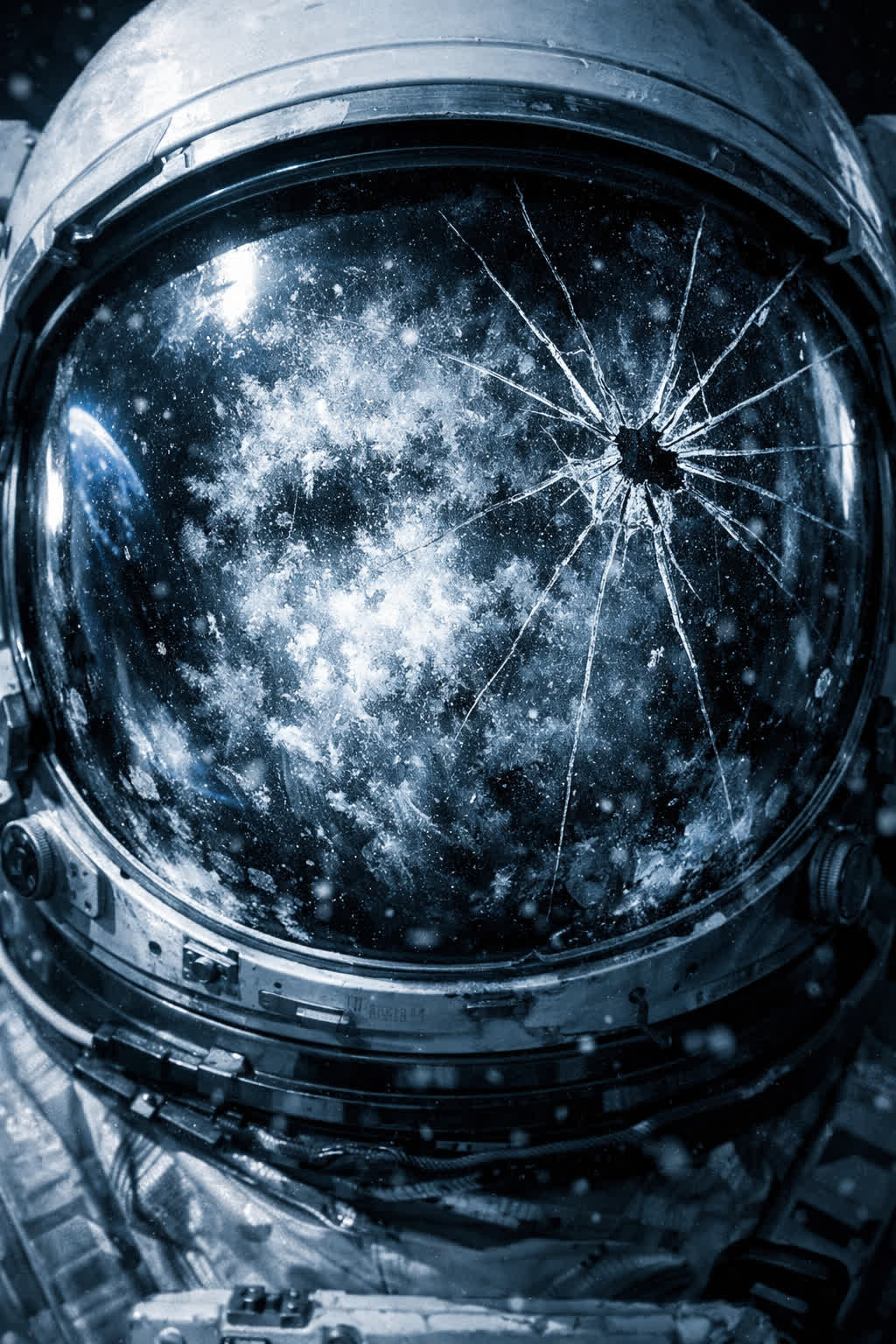
Frame 2: The Frozen Silhouette

Final Result: 10s Generated Clip
Even with the best tools, you can break the illusion if you ignore the basics. Avoid these three common traps:
1. The Lighting Trap: If Frame 1 is sunny and Frame 2 is pitch black, the AI will panic and create a flickering mess. Ensure your lighting direction and intensity are roughly similar in both frames. Use Truepix's Relight tools to match them before generating the video.
2. The 'Vague' Prompt: Never say 'Transform into.' That is lazy. Say 'Melts into,' 'Shatters into,' or 'Grows into.' You must describe the physics of the change to help the model simulate the transition.
3. The Aspect Ratio Mismatch: If your images are different sizes (e.g., one square and one portrait), the AI will stretch and warp them to fit. Always crop both frames to the same ratio (16:9 or 9:16) inside Truepix before you begin.
If you are doing a 360-degree product reveal (e.g., a soda can spinning), you will hit a common AI limitation: Gibberish Text. AI struggles to maintain readable logos while morphing geometry.
The Fix: Speed is your friend.
Do not prompt for a 'slow, elegant rotation' if your product has text. Instead, prompt for a 'Rapid, high-speed spin with motion blur.'
When the object spins fast, the text naturally blurs. This hides the AI's inability to render perfect letters from every angle, while still delivering a high-energy, professional look. It mimics real-world camera physics where fast motion causes blur, saving your brand integrity.
Here is the truth: Any visual effect you see on social media can be reverse-engineered with this workflow.
Whether it's a 'Under Construction' timelapse for real estate, a 'Real to Anime' transformation, or a 'seasons changing' loop—it all starts with defining your endpoints. You don't need to wait for a specific 'filter' to be released.
Follow the Truepix AI Social Channels. We drop inspiration and templates regularly. But remember: use them as a spark, not a rulebook. You are the Director. Use your imagination to craft the start and the end, and let our agents handle the heavy lifting in between.
This happens when your prompt is too vague or your frames are too different. Avoid words like 'transform' or 'change.' Instead, describe the physical action, like 'melts,' 'shatters,' or 'grows.' Also, ensure lighting matches in both frames.
Yes, but be careful. AI struggles to keep text consistent during rotation. We recommend prompting for a 'fast spin' or 'motion blur' to mask the text during the movement phase, ensuring the first and last frames (where the product is still) are high-resolution and readable.
No. Truepix AI is designed to move you from 'Prompt Engineer' to 'Creative Director.' Our intelligent routing picks the best model (like Kling or Veo) for you. You just need to provide the vision (the images) and a simple description of the movement.
Absolutely. Just ensure your input images are cropped to a 9:16 aspect ratio before you start generation. The video output will match your image input dimensions exactly.
The era of random AI generation is over. It's time to take control. Whether you are a filmmaker, a brand, or a creator, the First-to-Last frame workflow is your secret weapon for consistency and storytelling. Sign up for Truepix AI today, grab your free credits, and start directing your masterpiece.